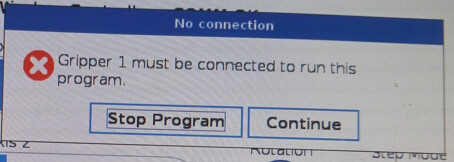
We have a UR3e with Robotiq Hand-E gripper that had been working last semester. Now I can’t run our programs, because I get the “Gripper 1 must be connected to run this program” error.
The grippers will and DO function with the TP, the UR+ menu will open and close the grippers with no errors. [We did upgrade to Polyscope 5.22, but I don’t think that is the issue.] We are a college, so all users (including me) are neophytes, not experts. Also, perhaps unrelated, the main menu shows a yellow warning triangle on the Installation tab.
Our Installation has not changed in two years and multiple Polyscope upgrades, so I don’t know why is giving us a warning, and I don’t know how to see exactly what that warning is about. These kinds of issues are not covered in just the basic literature. Any guidance would be appreciated. Kind regards…
I had a similar issue when we rented a UR5e. The Robotiq URCap was already installed but after loading in my own program, it said the same thing as your pop up window. In my URCap dashboard, it showed two grippers instead of one. I then went back to my program and made all my gripper open/close nodes to work with “Gripper 2”. After that, I had no issues. I think the previous user of the Cobot may have modified the URCap or had dual grippers installed so that’s why it didn’t work with my program…
If that isn’t your issue, then updating your Robotiq URCap to the latest version like efn said may work..
Thanks, everybody. I appreciate it. I’m going to see if I can update the URcaps (although I’ve never had to do that before when I’ve updated Polyscope). And then I was thinking I could try rolling back to Polyscope 5.21 or earlier, see if that works. The students may have modified my Installation file in a way I can detect, either, so I will try restoring an earlier version of that Installation, too.
Ivory, that “Gripper2” suggestion is good, too. I appreciate the help. I’ll post again with the results…
It’s not a good idea to roll back to a earlier software version, so I would try everything else beforehand. It shouldn’t be too difficult to get it to work - except if you have a faulty gripper for instance.
Also, you can just make a new installation. Then everything will be reset.
 It shouldn’t be too difficult to get it to work - except if you have a faulty gripper for instance.