I’m trying to position my robot using a Cognex 7600 camera.
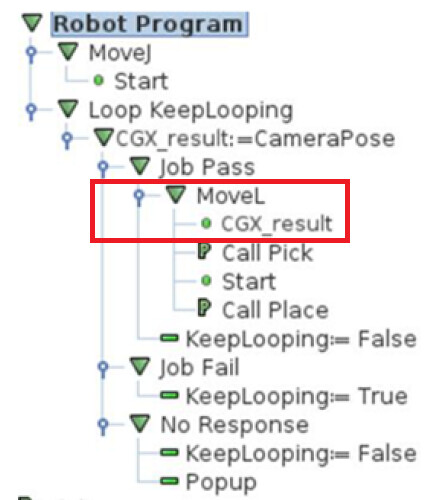
I followed the instructions as shown in the examples below.
At first, it worked well.
My problem is that my feature plane isn’t the same as the robot’s base feature. I had to create a new work plane.
I calibrate using the created plane without any problems, but the MOVE L command after the job pass, using the created plane, doesn’t work, only with the base plane.
Unfortunately not a good tip. I found that the Cogex URCAP was largely useless.
I have the camera mounted on the robot rather than stationary (which it does have options for) but it simply would never work, and as you say can only work in base robot coordinate system. Even the calibration methods were pretty useless for me in the end.
I ended up just doing the printed out grid calibrations from InSight software and talking to the camera over it’s Telnet connection. It’s no where near as user friendly as it should be, but I have got it functioning.
But I did manage to get it working in the where I have a grid of 4x5 locations and can run the same camera job in each location by moving the coordinate system (feature)…. but it involved a fair bit of messing around converting coordinates back and forth between coordinate systems (as the robot really seems to want to work in base coordinate system also).
Happy to share the camera script I have been using if it’s helpful for you.
I tried Cognex URCap a few years ago but quickly gave up. At best, it’s a minimalist first attempt.
Like @mattd , we now use a few lines of script to communicate with the cameras.
I was wondering if you would be willing to share the script that you wound up using for communication, as well as any general advice you may have. I’m trying to set up a UR10 for the company I’m interning at but none of us have used vision systems on robots before so it’s a whole new world.
No problem, sharing my script. I am a bit busy with other things right now so I’ll just attach my full script (it does a few other things too).
The procedures in the script that will be useful for you I think are;
CognexConnect – Run once to at program start.
LoadJob – Load a camera job on the camera and bring it offline if it is not.
CognexCapture – Take a photo and extract the results from variables in the cognex spreadsheet.
CalcFoundPose – pretty specific to what I am doing (camera mounted on robot wrist) and program repeats though and array of positions. So this adjusts the returned camera results to the current location. Also does some specific adjustments for certain blade types. Might be useful to see the logic required as all the robot script functions really only work in base coordinates. So either always work in base coordinates or get your head around these conversions to and from.
Just FYI I am using a cognex IS7800 configured with the insight explorer (6.5.1) software. Newer / smart cameras use a different software that I don’t know much about.
If you have any specific questions than let me know and I’ll try and explain more when I get time.