Hi URCap devs,
I’m trying to visit all the nodes of a specific kind of URCap in a program tree and append a number every one has to an array to be sent back to my view class, however I don’t think I am traversing the tree correctly.
This is what I have:
// return list of indices from program tree
    public Integer[] getFeatureIndicesFromProgramTree() {
        final List<Integer> indices = new ArrayList<>();
        indices.add(0);

        // Get the root of the entire program tree
        TreeNode root = apiProvider_.getProgramAPI().getProgramModel().getRootTreeNode(this);

        // Start the recursive traversal
        root.traverse(new ProgramNodeVisitor() {
            @Override
            public void visit(URCapProgramNode node, int index, int depth) {
                if (node.canGetAs(CustomPalletizingProgramNodeContribution.class)) {
                    indices.add(((CustomPalletizingProgramNodeContribution) node).getMyFeatureIndex());
                }
            }
        });

        // Convert the unique list to an array
        return indices.toArray(new Integer[0]);
    }
The index array is sent to a JComboBox which is supposed to show all the indices when clicked on, but currently it only ever shows 0, which I explicitly add before traversal.
CustomPalletizing is the node type that has the index I’m after.
Pointers in the right direction would be much appreciated. Thanks!
My first piece of advice would be to add a bunch of System.out.println() statements so you can check your process. It LOOKS good to me, but I would, for example, print the node.name() or something prior to your If statement. That lets you check whether your if statement SHOULD be running or not. Inside the if statement put another print. Print anything you want, just to make sure it’s properly in the if statement. Once there, print the index and depth of the traversal node, just to see more information. Finally, print the result of ((CustomPalletizingProgramNodeContribution) node).getMyFeatureIndex() before adding it, just to make sure it’s the proper value.
I guess it wouldn’t hurt to print indices.count() right before your return too. Just see if it has the correct amount of elements that it should.
If all of that checks out, it’s likely in how you’re constructing the combobox or populating it with values.
This is how I populate and update my combo box:
private void populateNodeDropdown(final    ContributionProvider<CustomPalletizingProgramNodeContribution> provider) {
    if (nodeSelectDropdown_ == null) return;
        nodeSelectDropdown_.removeAllItems();
    try {
        Integer[] indices = provider.get().getFeatureIndicesFromProgramTree();
        if (indices != null) {
            for (Integer i : indices) {
                nodeSelectDropdown_.addItem(i);
            }
        } // end if
        } catch (Exception ex) {
            // ignore
        }
}

public void updateNodeDropdown(Integer[] indices, int index) {
    if (nodeSelectDropdown_ == null) return;
        nodeSelectDropdown_.removeAllItems();
    if (indices == null) return;
        for (Integer i : indices) {
            nodeSelectDropdown_.addItem(i);
        }
    nodeSelectDropdown_.setSelectedItem(index);
}
And this is how I listen for changes inside my view:
nodeSelectDropdown_ = new JComboBox<Integer>();
// Populate from program tree via contribution
populateNodeDropdown(provider);
nodeSelectDropdown_.addActionListener(new ActionListener() {
    @Override
    public void actionPerformed(ActionEvent e) {
        Integer selectedIndex = (Integer) nodeSelectDropdown_.getSelectedItem();
        if (selectedIndex == null) {
            return;
        }
        provider.get().setLinkedFeatureIndex(selectedIndex);
    }
});
I call update dropdown from openview() and pass in the correct value.
What did you learn from printing stuff in the original post? Are you confirming that it’s something in the view then? If so, print more stuff! What are the results of your function calls? Is the data what you expect at a given moment in time?
For what it’s worth, I’ve always populated my dropdown boxes like this:
public void setFeatureSelectionItems(final Feature[] items) {
		featureSelectionBox.removeAllItems();
		featureSelectionBox.setModel(new DefaultComboBoxModel<>(items));
	}
Where do the println calls get printed? I’m running the cap through URSim and can’t see any of my lines.
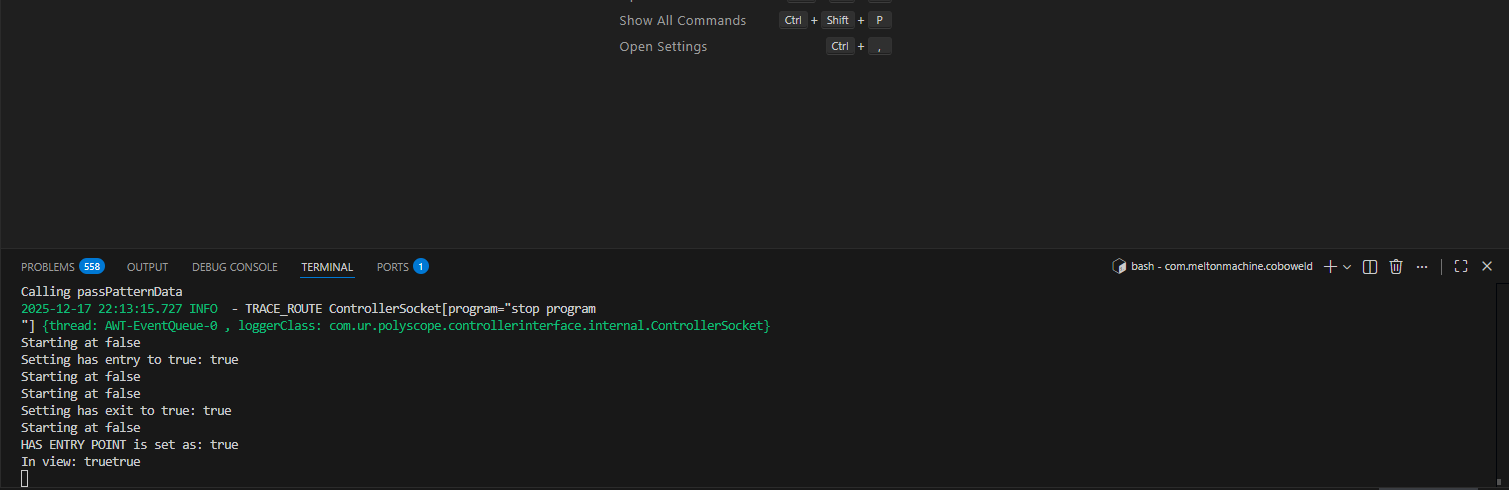
Not sure what your simulator environment is. But it should be showing up in whatever terminal you’re launching it from. For example, I use Docker and VSCode and the print statements are just in the Bash terminal:
So you’re running your sim by connecting to a localhost?
Yes and forwarding port 6080. So i login via web browser. To be honest I don’t even know how this thing is configured, I just followed the steps from a UR software dev. She gave me settings here: GitHub - pheobeyeung/universal_robots_sdk: Implementation of Universal Robots's SDK with VSCode Dev Container and Docker
Aha, I’m on port 5900 and using an app. I can’t see any output in my terminal.
This Docker thing will sometimes open 2 instances on top of itself, and I actually have to “power off” the robot (like via the hamburger menu on the teach pendent) and then a second simulator is already there. And for whatever reason my print statements were going through THAT instance
Ok, I’m going to try moving my entire project to using this way of running sim. I wish I’d found this repo when I was setting up my system.
The API version only goes up to 1.15 for me. Do you have this issue?
Not even sure where you see that. The POM file in my project shows I’m using urcap API 1.14.0
I’ve changed tactics for my application. I’m storing a global variable counter that I want to increment every time a new node is created in the program. How can I increment this variable? I can’t find a way to overwrite the old value.
OK… I still think you should figure out how to print things to the terminal, as this is the most basic form of debugging.
You’re going to need to be more specific. Is the global variable a urscript variable or a Java variable? Where are you trying to store it? Within the node’s data model? Installation? Static class? Should the node count be maintained per installation or per program?
I’ve since got my indexing working by creating multiple node specific global variables in URScript. I realised you cannot programmatically (i.e. from java) increment a urscript global variable once it has been initialised; you’d have to remove the variable and recreate it. Since I was using my index to scale movement operations within generateScript, I needed either a node specific index or to increment the index only once per program cycle. I decided the former was way easier.
As to the terminal debugging, I agree and will try figure this out. I would like to switch to the environment you linked, but the latest available SDK api in this environment is 1.14, and I’m currently using 1.17.
Thanks for your help, my GOAT!