# Position conversion in feature
**URL:** https://forum.universal-robots.com/t/position-conversion-in-feature/39086
**Category:** Technical Questions
**Created:** [March 18, 2025, 10:42am UTC](https://forum.universal-robots.com/t/position-conversion-in-feature/39086 "2025-03-18T10:42:30Z")
**Posts on this page:** 9
**Page:** 1
### Author:  [@ali.mohammadijou\_1](https://forum.universal-robots.com/u/ali.mohammadijou_1)
#### Post date: [March 18, 2025, 10:42am UTC](https://forum.universal-robots.com/t/position-conversion-in-feature/39086/1 "2025-03-18T10:42:30Z")
Dear Forum,
We have recently purchased 2 UR5s for our project. I have defined a new Feature Plane called “display” with following specs:
_p[0.5391674406968558,0.2501721015613766,0.3385201982265926,0.7230735002351665,-0.7705353908790852,-1.3823487705853308]_
I put the robot in a random position and read the following 2 Positions in respect to Base and display (I attached the photos):
_Point in Base: **p[0.45312, 0.30545, 0.47647, 4.071, -0.539, -2.517]**_
_When I switch to display, I read the following:_
_Point in display: **p[-0.05105, 0.06768, 0.14934, 1.727, -0.221, -2.762]**_
My question is, how to I convert them from one to another ? preferably using Math equations. or otherwise by using the Functions within a program.
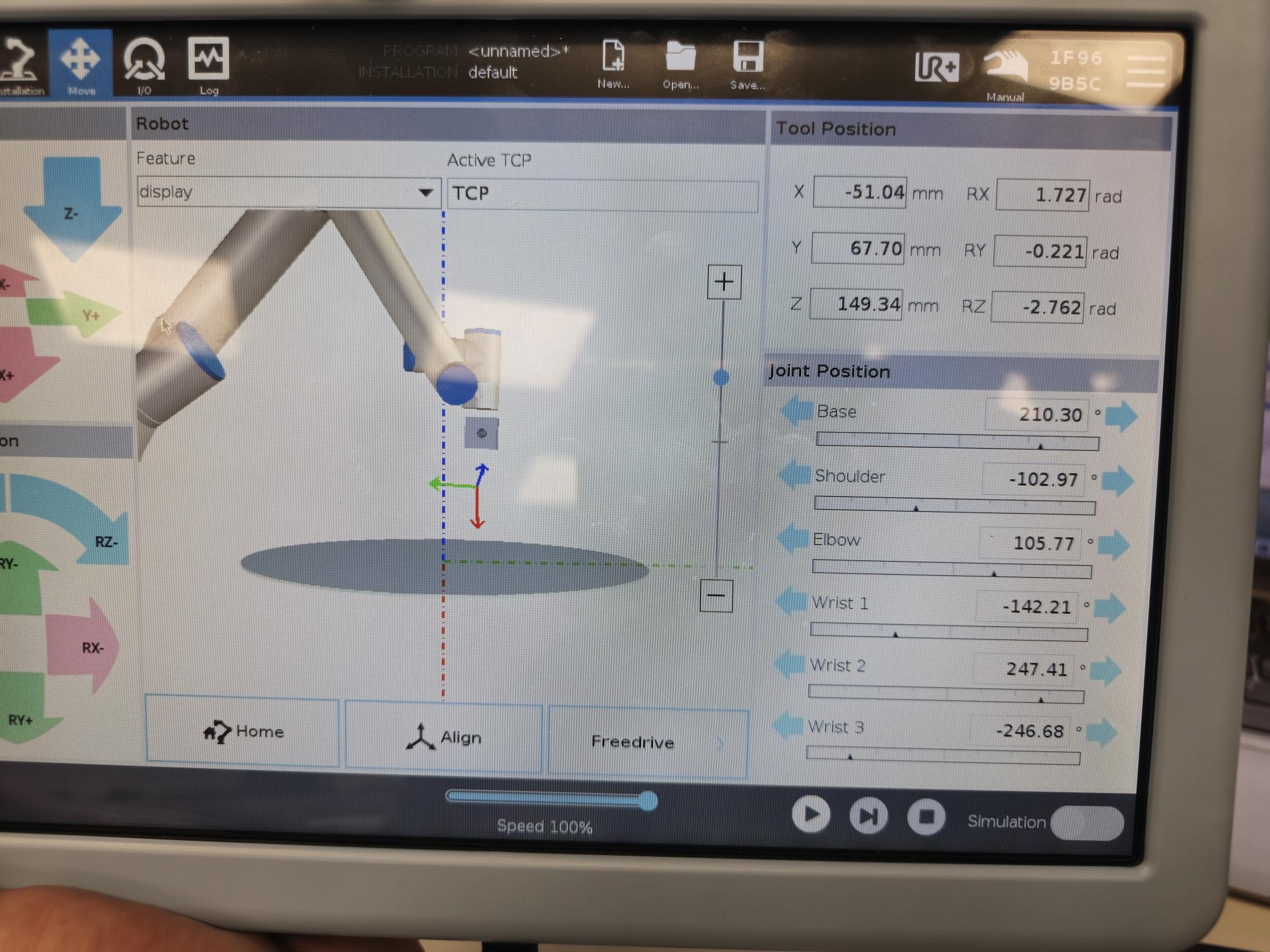

am.
---
### Author:  [@efn](https://forum.universal-robots.com/u/efn)
#### Post date: [March 18, 2025, 11:33am UTC](https://forum.universal-robots.com/t/position-conversion-in-feature/39086/2 "2025-03-18T11:33:19Z")
This should transform your base coordinates to your plane coordinates.

---
### Author:  [@ali.mohammadijou\_1](https://forum.universal-robots.com/u/ali.mohammadijou_1)
#### Post date: [March 18, 2025, 12:28pm UTC](https://forum.universal-robots.com/t/position-conversion-in-feature/39086/3 "2025-03-18T12:28:26Z")
Hi efn,
I tried your formula for a point. unfortunately did not work. I attached the photos.


---
### Author:  [@efn](https://forum.universal-robots.com/u/efn)
#### Post date: [March 18, 2025, 12:52pm UTC](https://forum.universal-robots.com/t/position-conversion-in-feature/39086/4 "2025-03-18T12:52:02Z")
That’s my bad. You must have your custom feature in the pose\_inv() and your position as the last argument in the pose\_trans. 🙂
---
### Author:  [@ali.mohammadijou\_1](https://forum.universal-robots.com/u/ali.mohammadijou_1)
#### Post date: [March 18, 2025, 1:13pm UTC](https://forum.universal-robots.com/t/position-conversion-in-feature/39086/5 "2025-03-18T13:13:24Z")
Hi efn,
Thanks for the correction. Indeed now the X, Y and Z are correct. but Rx, Ry and Rz are still incorrect. any thoughts on that ?

---
### Author:  [@efn](https://forum.universal-robots.com/u/efn)
#### Post date: [March 18, 2025, 1:31pm UTC](https://forum.universal-robots.com/t/position-conversion-in-feature/39086/6 "2025-03-18T13:31:49Z")
The rotations have other values, but the result pose is the same. 🙂 There are multiple solutions to each position.
If you write the values into the Move tab, then you will see the robot won’t move.
---
### Author:  [@ali.mohammadijou\_1](https://forum.universal-robots.com/u/ali.mohammadijou_1)
#### Post date: [March 18, 2025, 2:01pm UTC](https://forum.universal-robots.com/t/position-conversion-in-feature/39086/7 "2025-03-18T14:01:21Z")
Dear efn,
Indeed you are correct, the robot did not move. So I assume there is no way to convert the Rotation values ? since there are multiple solutions ?
---
### Author:  [@efn](https://forum.universal-robots.com/u/efn)
#### Post date: [March 18, 2025, 2:07pm UTC](https://forum.universal-robots.com/t/position-conversion-in-feature/39086/8 "2025-03-18T14:07:45Z")
Not that I know of, no. Do you actually need to have the same numbers, if the pose is the same? 🙂 You should be able to alter the pose as you wish still.
---
### Author:  [@dbarton](https://forum.universal-robots.com/u/dbarton)
#### Post date: [March 18, 2025, 2:11pm UTC](https://forum.universal-robots.com/t/position-conversion-in-feature/39086/9 "2025-03-18T14:11:10Z")
there are multiple ways. What is your end goal? If you want to just associate a position from base to your feature, you can just set that in the command section of the move. If you want to do different pose modifications on the fly, you may need a combination of pose trans and pose adds. I would suggest having a look through the URscript manual.
